Gaming Laptop for Work? 6 Surprising Reasons It Could Be Your Next Everyday PC
Posted by Deepak Shukala
Filed in Other 28 views
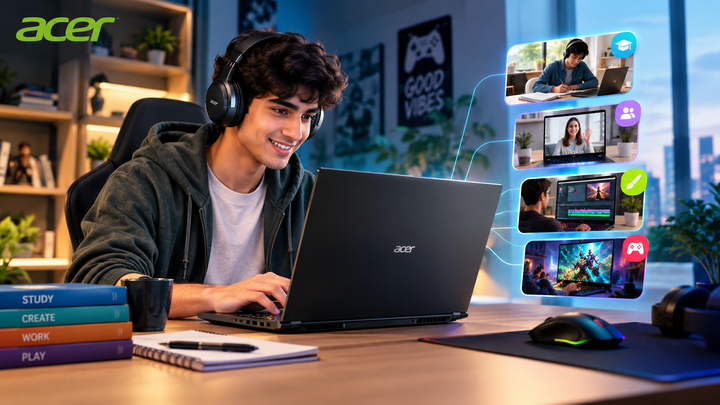
A laptop that can handle demanding games can also be surprisingly capable when it comes to everyday productivity. From attending online classes and video meetings to editing presentations, browsing the web, and managing multiple applications, today's performance-focused laptops can do much more than gaming.
That is where a Gaming Laptop becomes an interesting option for students, professionals, remote workers, and anyone who wants more performance from their everyday computer. With powerful processors, dedicated graphics, fast displays, and modern connectivity, a gaming-focused machine can double as a capable work and entertainment device.
But is investing in one actually practical for everyday use? Let's explore six reasons why a gaming laptop could be your next everyday PC.
1. Powerful Performance for Work and Entertainment
One of the biggest advantages of a Gaming Laptop is its performance-oriented hardware.
Gaming laptops are generally designed to handle demanding workloads. This means the same hardware that helps run modern games can also make everyday productivity feel smoother.
You can comfortably use a laptop for tasks such as:
- Microsoft Office and productivity applications
- Online classes and research
- Video conferencing
- Web browsing with multiple tabs
- Photo and basic video editing
- Programming and development tools
- Content creation
- Entertainment and gaming
A powerful processor combined with sufficient RAM can also help when switching between multiple applications.
For users who dislike slowdowns while multitasking, this extra performance can make a noticeable difference.
2. Better Graphics for More Than Gaming
Dedicated graphics are not useful only for playing games.
A modern GPU can accelerate several creative and professional workloads, including photo editing, video editing, 3D applications, and other graphics-intensive software.
For students studying design, architecture, engineering, animation, or media, having dedicated graphics can be particularly useful.
Even if gaming isn't your primary purpose, a capable GPU gives your laptop additional flexibility.
Who can benefit from dedicated graphics?
A graphics-equipped laptop can be useful for:
- Graphic designers
- Video editors
- Engineering students
- Architecture students
- Content creators
- Developers working with GPU-intensive applications
- Gamers who also need a work machine
This makes a Best Gaming Laptop more versatile than its name might suggest.
3. High-Refresh-Rate Displays Make Everyday Use Feel Smoother
Many gaming laptops now feature high-refresh-rate displays.
While a higher refresh rate is especially valuable for gaming, it can also make everyday interactions feel smoother. Scrolling through websites, moving windows, navigating applications, and watching supported content can feel more fluid.
Depending on the model, you may also find features such as:
- Full HD or higher resolutions
- High refresh rates
- Better colour coverage
- Slim bezels
- Anti-glare panels
- Larger screen sizes
If you spend several hours every day looking at your laptop, choosing a display that suits both productivity and entertainment can make a difference.
4. Multitasking Becomes Easier
Students and professionals rarely use just one application at a time.
You might have a browser open alongside a document, messaging application, video call, spreadsheet, and presentation. A laptop with a capable processor and enough memory can manage these workloads more comfortably.
For everyday productivity, consider:
- At least 16GB RAM if your workload involves heavy multitasking
- A fast SSD for quicker application and file access
- A modern multi-core processor
- Adequate cooling for sustained workloads
A well-balanced configuration can help you move from work to entertainment without needing a second machine.
5. Gaming Laptops Can Be Great Entertainment Devices
After a long day of work or classes, your laptop can also become an entertainment hub.
A gaming laptop can handle demanding games while also supporting movies, streaming, music, and other digital entertainment.
This makes it appealing for people who don't want separate devices for productivity and gaming.
However, remember that gaming laptops can be heavier and may have shorter battery life than ultraportable productivity laptops. Therefore, portability should remain an important consideration before buying.
6. One Device Can Cover Multiple Needs
Perhaps the biggest advantage is versatility.
Instead of buying one laptop for work and another device for gaming or creative applications, a capable gaming laptop can potentially cover several use cases.
For example, a student could use the same device for:
- Online lectures
- Assignments and presentations
- Coding
- Research
- Creative projects
- Gaming
- Streaming
Similarly, a young professional could use it for remote work during the day and entertainment in the evening.
This all-in-one approach can make sense for users who value performance and flexibility.
Benefits of Using a Gaming Laptop as an Everyday PC
Choosing a gaming laptop for daily computing can offer several advantages:
- Strong performance: Suitable for demanding applications and multitasking.
- Dedicated graphics: Useful for gaming and creative workloads.
- Fast storage: SSDs can improve boot and application loading times.
- High-quality displays: High refresh rates can provide smoother visuals.
- Versatility: One device can handle work, study, entertainment, and gaming.
- Longer usable life: Higher-performance hardware can provide additional headroom as applications become more demanding.
Gaming Laptop Buying Guide: What Should You Check?
Before choosing a Gaming Laptop, don't focus only on the graphics card or processor. Consider the complete configuration.
- Processor: Choose a modern processor that can comfortably handle your daily workload, multitasking, and gaming requirements.
- RAM: For basic productivity, lower memory configurations may be sufficient. However, 16GB RAM is a practical target for users who regularly multitask or use demanding applications.
- Storage: An SSD should be a priority. Look for sufficient capacity for your operating system, applications, documents, games, and media files.
- Graphics: Choose the GPU according to your gaming and creative requirements. Casual gamers may not need the same graphics performance as users playing demanding AAA titles.
- Display: Look at resolution, refresh rate, brightness, colour accuracy, and screen size. Don't choose a display based solely on refresh rate.
- Battery and Portability: If you frequently work from cafés, classrooms, offices, or different locations, check the laptop's weight, dimensions, battery capacity, and charger size.
- Cooling: Gaming and demanding workloads generate heat. A capable cooling system is important for maintaining performance during longer sessions.
Common Gaming Laptop Buying Mistakes
Avoid these mistakes when choosing your next laptop:
- Buying Only for the GPU: A powerful graphics card cannot compensate for insufficient RAM, storage, or an unsuitable processor.
- Ignoring Weight: Gaming laptops can be heavier than traditional productivity notebooks. Consider how often you'll carry yours.
- Choosing the Highest Refresh Rate Automatically: A higher refresh rate can be useful, but it shouldn't come at the expense of other important display characteristics.
- Forgetting Connectivity: Check for the ports you actually need, including USB, HDMI, audio, and other connectivity options.
- Ignoring Your Actual Workload: Don't pay for performance you will never use. Match the configuration to your gaming, study, work, and creative requirements.
Styling Tips for Your Everyday Gaming Laptop Setup
Your laptop can be both a performance tool and part of your workspace.
For a clean setup, consider pairing your laptop with:
- A comfortable external keyboard and mouse
- An ergonomic laptop stand
- A larger external monitor
- A USB-C hub where required
- Good-quality headphones
- A dedicated desk mat
- Proper cable management
A simple setup can make a gaming laptop feel equally at home in a professional workspace or gaming environment.
Explore Gaming Laptops from Acer India
If you want one device that can balance productivity, entertainment, and gaming, explore the range of laptops available from Acer India.
Before making your decision, compare specifications, display features, graphics performance, RAM, storage, portability, and your intended workload.
You can explore Acer's laptop range and find a configuration suited to your requirements on the official Acer India Store.
Conclusion
A Gaming Laptop can be much more than a machine for playing games. With powerful processors, dedicated graphics, fast storage, capable displays, and strong multitasking performance, it can become a versatile everyday PC for students, professionals, creators, and entertainment-focused users.
The key is choosing a configuration that matches your actual needs rather than simply buying the most powerful specifications available.
If you're looking for a laptop that can move seamlessly between work, study, creativity, and gaming, explore the latest options from Acer India and choose the configuration that fits your everyday lifestyle.
FAQ's
1. Is a gaming laptop good for everyday work?
Yes. A gaming laptop can handle common productivity tasks such as web browsing, office applications, video conferencing, programming, and content creation. However, weight and battery life should be considered if portability is important.
2. Can I use a gaming laptop for college?
Yes. A gaming laptop can be useful for students who need performance for gaming, programming, design, engineering software, or creative applications. Students should also consider portability and battery requirements.
3. Is a gaming laptop better than a regular laptop for work?
It depends on the workload. A gaming laptop generally offers more performance and dedicated graphics, while a traditional productivity laptop may prioritize portability, battery life, and a lightweight design.
4. How much RAM is recommended for a gaming laptop in 2026?
For users who regularly multitask, play modern games, or use demanding applications, 16GB RAM is a practical starting point. Higher-capacity configurations may be useful for heavier workloads.
5. Can a gaming laptop be used for video editing?
Yes. A gaming laptop with a capable processor, dedicated GPU, sufficient RAM, and fast SSD can be suitable for video editing and other creative workloads.
6. What should I look for in the best gaming laptop?
Look at the processor, GPU, RAM, SSD capacity, display, cooling, battery life, connectivity, portability, and overall configuration rather than focusing on a single specification.