Avoid Costly Mistakes: How to Choose the Right Power Cord Every Time
Posted by sf cable
209 views
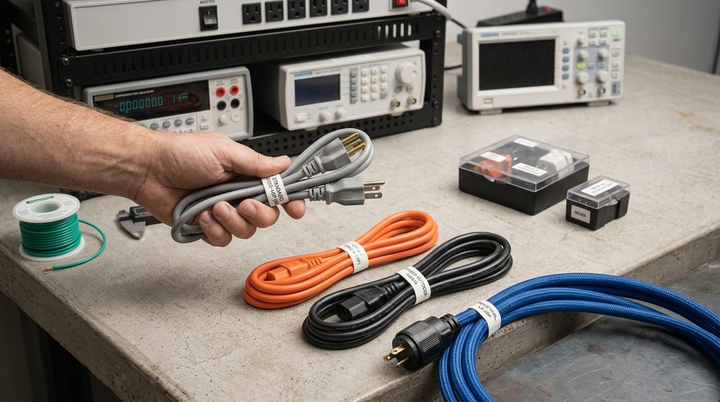
Power cords are often overlooked until a device won't turn on, a plug doesn't fit, or a cord overheats. Choosing the right power cord is about more than simply connecting a device to power it directly affects safety, performance, and equipment reliability. Whether you're replacing a damaged cord, setting up office equipment, or installing networking hardware, understanding the basics can help you avoid costly mistakes and ensure safe operation.
This Power Cord Buying Guide covers all the details you need to know to prevent the common and expensive power cord missteps.
Why Choosing the Right Power Cord Matters
While a power cord may sound like a basic accessory, it actually has a significant impact on the safe and efficient flow of electricity from an outlet to your gadget. There are several issues that can arise with the wrong cord:
- Equipment may fail to power on if the connector is incompatible.
- Cords that are overloaded with too much power for the wire's rating can overheat.
- Electronic damage due to voltage mismatch, particularly of sensitive electronics.
- Failure to meet safety certification requirements, potential fire and/or shock hazard risk.
Understanding Connector Types
The main features that differentiate power cords are the connectors located on both ends. Typically, there is a plug on one end for inclusion into a wall outlet, and a connector on the opposite end for insertion into the device. These connectors are standardised as per international standards mostly IEC (International Electrotechnical Commission) and NEMA (National Electrical Manufacturers Association).
IEC Connectors
For many power cords, particularly those that carry power to computers, monitors, servers and audio/video equipment, the IEC connectors are a standardized shape that's attached to the end of the device. For example, C13/C14 connectors are commonly used with desktop computers, monitors, and printers, while C19/C20 connectors are designed for high-power equipment such as servers, PDUs, and enterprise networking devices.
NEMA Connectors
NEMA connectors are common in North America and usually are connected to the wall outlet end of a cord. This is because there are various standard NEMA plugs, such as NEMA 5-15 and NEMA 5-20, indicating outlets with different amperages. The choice of NEMA plug is dependent on the outlet(s) you have and the amount of amps your device needs.
NEMA 6-15 Connectors and Extension Cords
The NEMA 6-15 configuration is designed for electrical equipment that requires 250V at up to 15 amps and is commonly used for higher-voltage equipment in commercial, industrial, and specialized applications. A NEMA 6-15 plug has two horizontal blades and a grounding pin, making it distinct from standard 120V NEMA configurations. When additional reach is needed, a NEMA 6-15 extension cord can extend the connection while maintaining compatibility with equipment and outlets designed for this configuration.
Wire Gauge and Amperage – What They Mean
One of the more subtle yet significant properties of a power cord is the size of its wire gauge, which is labeled as AWG (American Wire Gauge). The smaller the AWG number, the thicker the wire; the thicker, the more current that can flow through it. A device's electrical requirements, the diameter of the wire, and the thickness of the insulation determine the maximum safe amperage of a cord. A thin wire and thin gauge insulation can cause a cord to overheat and, over time, deteriorate, and, in rare instances, spark a fire.
As a general rule:
- Any type of device with lower power requirements such as laptops or small accessories will usually require 18 AWG cords.
- Other applications, like large monitors, industrial machinery and higher-power devices, may need 16 AWG or greater.
- Longer extension cords should be lower AWG to make up for the voltage drop over distance
However, before purchasing, always refer to the amperage rating stamped on the device or on the bottom of the cord and compare with the power needs of the device.
Voltage Compatibility
When it comes to voltage power cords aren't universal. Most of Europe, Asia and other parts of the world are on 220–240V, while North America is on 120V. If you are operating the equipment outside of the U.S. or importing the equipment from another country, you will require not only a cord with a compatible voltage but a voltage converter in certain instances.
Safety Certifications to Look For
Quality power cords will be marked to verify that they have been tested for safety and performance. Common certifications include:
- UL (Underwriters Laboratories) for North America
- The EEA has been designated by CE.The EEA is CE marked.
- CSA for Canada
- The absence of specific hazardous chemicals on the cord (ROHS compliance)
Ensuring the Cord is a Compatible Size for Your Device
All power cords must be a match in three ways: outlet, device inlet, and power consumption. This is often the case when using a desktop computer, particularly when the monitor, server or networking equipment is attached to it, and many of these devices have a female connector on the device and a male connector on the cable. Always verify the connector type, voltage rating, current rating, and wire gauge before purchasing a replacement cord.
For example, if the device has a C14 inlet, a cord with a connector on the device end that matches the connector on the device's inlet is required.One of the most common combinations for computers, monitors, printers, and networking equipment is a C13 connector paired with a C14 inlet. When replacing a cord for this type of configuration, it can be useful to look for a c13 to c14 power cord as opposed to an appearance-based guess since the same-looking connectors may have different configurations or current ratings.
Common Power Cord Buying Mistakes to Avoid
- If all cords are identical then they can be used interchangeably. There are connector shapes that can be similar but have different amperages.
- Avoiding the correct size of wire. A cord which fits well but is too small for the draw is still a fire hazard.
- Overlooking cord length. The longer the cord the more resistance and voltage drop, particularly with thin gauge wire.
- Purchase of non-approved cords for cost savings. The initial cost savings are often minimal, and the loss of safe equipment is more costly than the safety risk.
Power Cord Buying Checklist
If you're buying a power cord, follow this brief list of steps:
- Let's verify which types of connectors are required on each host (from to and to wall outlet).
- Verify the amps and wire size with the device's power consumption
- Check the voltage compatibility for your area and equipment
- Ensure that you look for well-known safety certifications
Final Thoughts
Choosing the right power cord doesn't have to be complicated. By checking the connector type, wire gauge, voltage, current rating, and safety certifications before buying, you can prevent compatibility issues, improve equipment reliability, and reduce potential safety risks. Spending a few extra minutes verifying these details will help ensure you purchase a power cord that performs safely and reliably for years to come.
Full Article :- https://skytechgeek.com/2026/07/avoid-costly-mistakes-how-to-choose-the-right-power-cord-every-time/