Shopify Lite vs. Full Shopify: Selling Online Without the $39 Monthly Fee
Posted by Dimai Kandi
Filed in Other 3 views
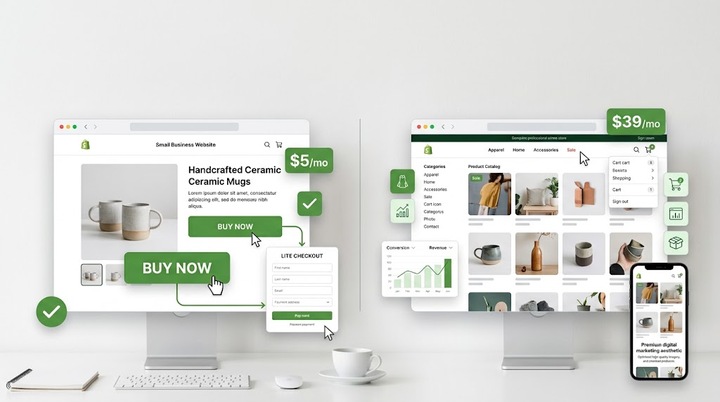
Shopify is typically the first platform that comes to mind when you decide to sell online. It is reliable, easy to use, and handles the technical side of e-commerce. But the standard plan now costs $39 a month. For a new business, that monthly fee can eat into your margins before you make your first sale.
Here is the good news. You do not actually need the full Shopify plan to sell your products. Shopify offers a much cheaper option. It used to be called Shopify Lite, and it is now known as the Starter plan. It costs just $5 a month.
Let's break down the differences between Shopify Lite and full Shopify. We will look at how each works, and how affordable web design can help you sell online without paying the $39 price tag.
What is Full Shopify?
Full Shopify gives you a complete website. When you sign up for the Basic plan at $39 a month, you get a standalone storefront. This means Shopify hosts your website. You build your pages, add your products, and customize your theme using their built-in tools.
The checkout process happens entirely on your domain. Customers browse your site, add items to their cart, and check out without ever leaving your website. You also get access to features like abandoned cart recovery, discount codes, and detailed inventory tracking.
Full Shopify is a good fit if you do not have a website yet. If you are starting from scratch and need a platform that handles everything from hosting to security, the $39 a month makes sense.
What is Shopify Lite (The Starter Plan)?
Shopify Lite turns things around. Instead of giving you a full website, it gives you a checkout system. You can add a "Buy Button" to any existing website, blog, or social media profile. When a customer clicks the button, a secure checkout window pops up.
This plan costs $5 a month. It does not include a storefront. You have to bring your own website.
With this plan, you can also sell directly through social media platforms like Instagram and Facebook. You can send product links via email or text message. If you offer services, you can generate invoices and let clients pay online.
Essentially, Shopify Lite handles the transaction. Your existing website handles the presentation.
Combining Shopify Lite with Cheap Website Design
This is where things get interesting. If you want to keep costs low, you can pair Shopify Lite with cheap website design options. Let's say you already have a WordPress site, or you build a simple site using Wix or Squarespace. You can design your site exactly how you want it.
You do not need to pay for expensive e-commerce plugins or higher-tier hosting plans. Instead, you design a great-looking site using basic tools or free themes. Then, you copy and paste the Shopify Buy Button code onto your product pages.
Your visitors see a professional website. They see a clean product image, a price, and a buy button. When they click it, the Shopify cart opens. The customer pays securely through Shopify. You get the order in your Shopify dashboard.
This approach works incredibly well for small businesses. If you sell digital products, handmade crafts, or a small number of physical items, you do not need a massive store. You just need a way to process payments. By combining a basic website with the $5 Shopify plan, you get the best of both worlds.
The Checkout Experience
The biggest difference between the two plans is how customers pay.
With full Shopify, customers add items to a cart. They can browse your store, pick out multiple items, and check out once. The cart lives on your domain. This creates a smooth experience.
With Shopify Lite, the experience is different. The buy button is tied to a specific product. If a customer wants to buy two different shirts, they have to buy one, and then buy the other. Or, you can create a collection buy button, but it is still less flexible than a full storefront.
For stores with one-off products or services, this is not a problem. For stores with lots of variations, it can frustrate buyers.
SEO and Traffic
Full Shopify gives you a dedicated e-commerce structure. It automatically generates product pages, category pages, and handles the technical SEO for e-commerce.
When you use the Starter plan, your products live on your main website. You have to handle the SEO yourself. This is actually a benefit for many people. If you already have a popular blog, your existing traffic can buy products directly from your posts. You do not have to send them to a separate Shopify store.
Comparing the Costs
Let's look at the numbers. If you go with full Shopify, you pay $39 a month, plus transaction fees unless you use Shopify Payments.
If you go with the Lite plan, you pay $5 a month. You might pay around $10 to $20 a month for your website hosting if you use WordPress. Even with hosting, your total cost is under $25 a month. If you use a free website builder, your only e-commerce cost is the $5 Shopify fee.
Over a year, the savings add up. You save over $400 compared to the standard Shopify plan.
When Should You Choose Shopify Lite?
Shopify Lite is not for everyone. You should choose it if you fall into one of these categories:
-
You already have a website. If you have a blog, a portfolio, or a business site, just add the buy button.
-
You sell a limited number of products. If you have five products, building a full store is overkill.
-
You want to test a product. If you are not sure if your product will sell, do not spend $39 a month. Test it for $5.
-
You sell mostly on social media. If your customers find you on Instagram, use Shopify to process the payments.
When Should You Upgrade to Full Shopify?
The Starter plan has limits. You will eventually outgrow it. You should upgrade to full Shopify if:
-
You have a large inventory. Managing hundreds of products on individual pages gets messy.
-
You need a dedicated cart. With the buy button, customers usually buy one item at a time. Full Shopify lets them browse a catalog and fill a cart.
-
You want to use advanced features. If you need gift cards, professional reports, or complex shipping rules, you need the full platform.
-
You want to scale. If your business is growing fast, the $39 a month is worth the convenience of an all-in-one system.
Setting Up Your Buy Button
Setting up Shopify Lite is straightforward. You create a Shopify account and choose the Starter plan. You add your product details, images, and prices in the Shopify dashboard.
Then, you click on the product and select "Create Buy Button." Shopify generates a small piece of HTML code. You take that code and paste it into your website builder. Most platforms, like WordPress, have a custom HTML block where you can drop this code.
The button appears on your site. You can customize the text, color, and layout before you generate the code.
One challenge with using Shopify Lite is making the buy button look like it belongs on your site. If you paste a generic button onto a custom page, it might stand out.
Take a few minutes to style it. In your Shopify dashboard, you can change the button color, font, and size. Match the background color of the button to your website's primary color. Make the text white or black, depending on what is easier to read.
You can also choose how the product details show up. You can display just the button, or you can show the product image, title, and price together. If you use WordPress, make sure your theme's styling does not conflict with the Shopify code. Sometimes your theme will try to override the button's size. If that happens, you might need to adjust the code slightly, or just use a simpler layout.
When styled correctly, the buy button blends in. The customer will not realize they are checking out through a different service. It just feels like a normal part of your website.
Conclusion
Starting an online store does not have to be expensive. While full Shopify is a powerful tool, you do not always need it. If you are starting out, keep your money. Use affordable web design to build your site. Add the Shopify Starter plan to handle your transactions.
By skipping the $39 monthly fee, you can invest that money elsewhere. Buy better materials, run ads, or improve your marketing. Once your sales increase and you need more features, you can always upgrade.
Do not pay for features you do not use. Start small, test your market, and upgrade only when it makes financial sense.